
/ Topics / Hz System Overview
Hz System Overview, The Sandbox
Asset-based, Nonlinear Workflow
Authoring Musical Notes . Soundscaping
Audio IO . MIDI IO
Debugging Your Scripts
Comparing Programmable Audio Systems
home . Topics . Interface . Reference . Examples
flag Hz proposes programming as a powerful tool for musical expression. AI tools have made programming more accessible and so, of course, Hz is too!
Here you'll find a fairly dry discussion of all the components of Hz and how they fit together.
Overview
HzWeb (Hz) runs in standard Web Browsers and is built upon WebAudio, WebAudio Modules, JavaScript and HTML. Hz is controlled by both GUI operations as well as by user-authored or example scripts written in JavaScript.
Users author soundscapes, or musical compositions, through a combination of Songs.hz sheets and/or JavaScript control scripts. Control scripts employ the Music API, to instantiate WAM plugin including Hz-builtin nodes into an audio graph.
User-scripts run in a Sandbox to minimize interference between system and user scripts. Scripts can run "simultaneously" either in different in sandboxes or within asynchronous Fibers within the same sandbox.
During script performance, sounds are triggered by delivering sample-accurate events (MIDI, Notes, Parameter ehanges, etc) to the nodes in the graph. Events cause nodes to alter their audio signal processing and changes propagate through the audio graph ultimately producing the "mix" delivered to your audio output device.
Because Hz nodes are WAM plugins the audio capabilities of the engine are virtually unlimited. You can author your own plugins or procure them from commercial or freeware purveyors. See Resources for more details.
Hz ships with a basic set of plugins so you can get going immediately. See Getting Started to take the first baby steps with Hz.
Hz Scripting and Native Components
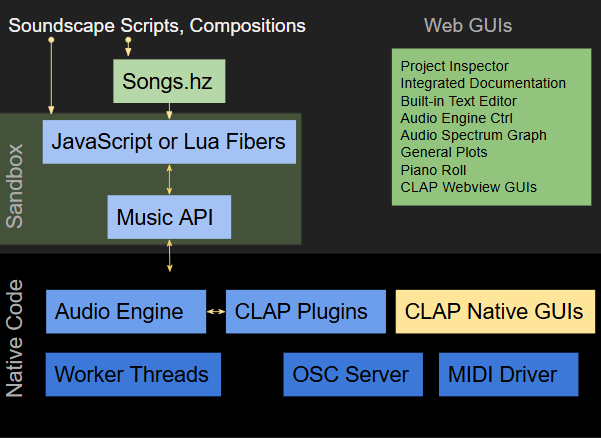
As seen above, Hz is divided into web-audio "native" and scripting components. Scripting components are further divided into two categories: Sandbox and Web GUIs. All of the Hz GUIs are written atop a simple Javascript GUI library (libDOMapp) and can be inspected with the usual web-dev toolset.
Your custom scripts run in separate JavaScript sandboxes to ensure clean, reproducible execution contexts for them. JavaScripts running in a sandbox window can opt to update this sandbox window contents as shown by the Tower of Hanoi example. Manipulating the webview DOM is widely understood and well documented online, so providing details on the topic is beyond the scope of this Hz documentation. The same holds true for other web technologies like Web Workers, JavaScript Async Promises and so on.
Scripts communicate with native code via a variety of APIs and event notification mechanisms. For example, Hz.DAC receives updates from its webaudio processor at a regular refresh rate. Similarly, your control scripts utilize the Music API to update the audio graph, schedule notes and modify note expression parameters or to synchronize with other asynchronous tasks.
The manner in which you author your creations is a personal choice that may change with your project. This choice can be informed by a discussion on notes and events found here.
info As with most programable systems you are limited only by your imagination and programming skilz.
Our Examples may also help stimulate your thinking on this topic.
Native GUIs
Most WAM plugins build their user interfaces using plugin-specific web GUI libraries. The resulting panels can be presented within the Sandbox window associated with your scripts. Your scripts can Show or Hide these panels.
The Audio Graph
The audio engine processes multiple frames (a chunk) of audio sample data in the order expresssed by your the audio graph. Graphs are constrained to be directed and mostly acyclic (ie they must be a DAG). WebAudio supports cycles in audio graphs that involve delay and echo.
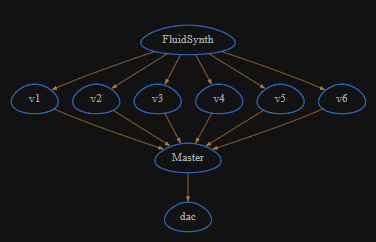
The results of a node calculation are passed to downstream nodes and generally wend their way to the DAC (digital-to-analog) node representing your audio output device. The graph representation is powerful in that it compactly exposes potential parallel processing oppportunities to the audio engine and concisely represents all the data flow in an audio session. The graph can be efficiently updated on the fly by your control scripts using the Music API. This means you can achieve computational efficiencies as the complexity of your creations change. This is often reflected in live voice counts and load average as displayed by Plugin GUI panels.
Node Events
Not explicit in the audio graph display is the event-flow requested by your control scripts. Events are delivered aynchronously to graph nodes prior to each audio sample chunk processing. They are tagged with a timestamp (either ASAP or a future time) to describe correct ordering. In order to achieve sample-accurate event scheduling the chunk size of a computational unit may be modified to align with event request timing. The WAM plugin API characterizes the event handling machinery and requires that adhering plugin instances (aka nodes) react to sub-chunk event requests accordingly. Events fall into two categories: plugin parameter value edits and standard note or MIDI on/off/expression.
Audio Nodes and Modulation
Most nodes present in the audio graph are Anodes. These process audio signals from 0 or more input ports to produce audio signals on 1 or more output ports.
In WebAudio, parameters can be modulated by connecting signal generators directly to them. You can also programmatically modify parameters using the Anode.SetParam method.
WebAudio Performance
Native Nodes
Standard WebAudio nodes are built-in to your browser. Such nodes are the highest performance since they are precompiled and pre-optimized.
AudioWorklets
WebAudio supports plugin or custom nodes and to achieve high-performance audio processing AudioWorklets allows the system to offload audio computations from the browser/GUI thread.
Understanding WebAudio threads is NOT required to create soundscapes with Hz. Understanding fibers is a separate topic and a feature of the MusicAPI that allows you to create, control and synchronize independent user-level scripts. For this reason understanding fibers MAY be a topic worthy of your attention.
WASM
Some WebAudio plugins are distributed with web-assembly (WASM) components. These are way more efficient than their JavaScript equivalent however, they are more difficult to inspect since they are often compiled from c, c++ or faust.
Worker Threads
Worker Threads may also be used by GUIs to to support asynchronous calculations. Again, this is not something you need to understand unless you plan to develop WAM plugins.
Stats
WebAudio supports some diagnostic tools to help you understand performance bottlenecks in your system. These tools are highly dependent on your Browser and so we'll leave it at that.