
/ Interface / Sample Manager Dialog
Menubar . Workspace Panel . Log Panel . Fibers Panel
Code Editor . Image Editor
SoundEditor . SoundPlayer . EnvelopeEditor
Plugin Explorer Dialog
home . Topics . Interface . Reference . Examples
waves
Wherein we present the Sample Manager Dialog.
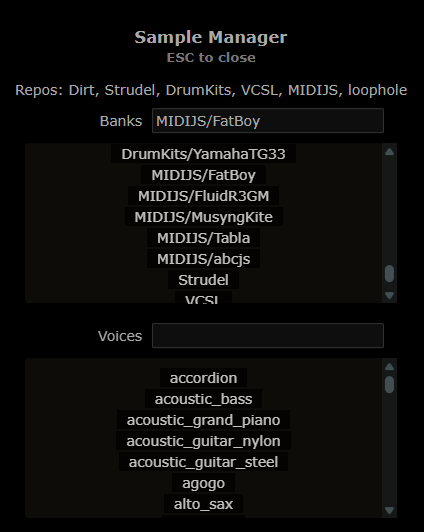
This simple dialog enumerates the internet-based audio sample files available for installing into your current workspace.
As described elsewhere,
the available options are determined by a repolist file and
you can replace or extend the default repolist that ships with Hz.
Sample files are identified by a combination of repo, bank
and voice names and are used by sample-playing anodes like
Hz.Samplo.
First, enter or select the name of a sample bank you're interested in.
The bank list updates with each keystroke in the Banks entry producing
0 or more banks that match the letters you've entered.
Any matches are presented as buttons which, when pressed, update the voices list.
If the bank has a lot of voices the Voices entry can
be used to filter out unwanted ones.
When you click on a voice, its details appear at bottom.
You can also right-click on a voice to trigger background
installation of its sample files. Status of the download is
reported in the Log Panel and you may need to
manually right-click refresh below the _cache area of your
Workspace to see and
audition the new files.
Note that the capabilities of this dialog can also be implemented in your scripts using the SampleMgr API.