
/ Interface / EnvelopeEditor
Menubar . Workspace Panel . Code Editor
SoundEditor . SoundPlayer . EnvelopeEditor . Image Editor
Plugin Explorer . Log Panel . Fibers Panel
home . Topics . Interface . Reference . Examples
show_chart Envelopes are commonly used to describe an envelope function for use by LFOs like Hz.LFO. You can think of Envelopes as
y = f(x)and often (as with LFOs) x represents a time or phase value.We've taken this idea to an extra dimension and introduce
Deep Envelopeswhere you define a topo-surface of values (eg amplitudes) defined over a plane. For the mathematically inclined,y = f(x, z). This representation is well suited to describe a time varying spectral filter and is central to the operation of Hz.Spectre. THere, x represents frequency and z represents time.You may also find other uses for Envelopes in your soundscapes. You can copy and paste envelopes between
Envelope Editor, script files, and other GUIs where applicable. We also provide a Envelope class in the MusicAPI.Envelope files are small files containing a sequence of control points (knots) that describe an envelope function. An envelope is divided into segments where each
segmenthas two endpoints (circles) and a singlemidpoint(square) that controls its curvature. All knots are described within a coordinate system on[0-1]in both t (x) and y.Deep Envelopesare represented in the same format by wrapping a simple envelope into an array with an associated z for each envelope.
Interface
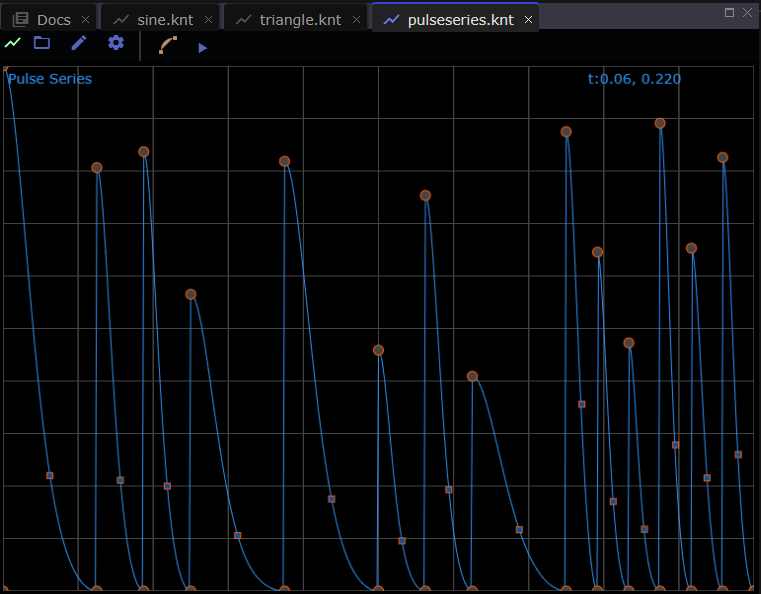
An Envelope Editor panel appears if you select a file with extensions
.knt or .vitallfo from the workspace panel. You can also create
a default envelope session by selecting Envelope Editor from the
Layouts Menu.
Basic Editing
ctrl-clickatop an endpoint to delete its (following) segment.double-clickto insert a new linear segment between two endpoints.dragan endpoint in x and y to move it in time and space. Hold/releaseShift-Keyto snap/unsnap endpoints to nearby grid locations.draga midpoint in y to modify its curvature.copyand paste entire envelopes between editors and other applications. e click the globalsmooth buttontotogglesmoothing for the envelope.undoandredothe above operations.savethe edited result to a file.- use
Newto reset the editor to a simple triangle envelope.
Deep Editing
A deep envelope is indicated by the presence of the z-slider.

To convert a simple envelope into a deep envelope you can simply
select Add Plane from the Edit Menu. You can also copy a single
plane from a deep envelope and paste it into a simple envelope to
go from deep to simple.
Each plane is represented by a yellow diamond on the z-slider where
z goes from 0 to 1, left to right. Above we can infer that the
deep envelope has 4 editing planes. The current z is controlled
and represented by the green slider "thumb". Drag it anywhere along
the z to visualize envelope the produced by interpolating adjacent
planes.
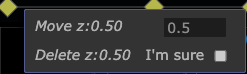 Right-clicking on a yellow knot reveals a context-menu that can be
used to move or delete the plane.
Right-clicking on a yellow knot reveals a context-menu that can be
used to move or delete the plane.
Grid Style
You can choose how to represent a background grid with the settings
menu. When operating in Uniform grid style, holding the shift-key
will cause knots to snap to a nearby grid point when draggin.
The Log grid style is useful for visualizing envelopes for
spectral filtering. Note that the LogMin, LogMax are stored
in the knt file and should be used by envelope-consumers to
interpret the envelope.
Sonifying Previewer
In addition to displaying a plot of the envelope function you can
also hear the envelope in action using the Play/Pause menubar controls.
We use your system's built-in sound engine (WebAudio) to vary
a single oscillator's frequency according to the current value of x
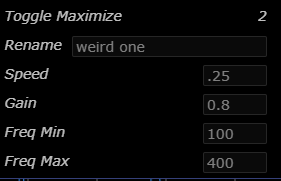
and the envelope's value at that point. You can modify playback
parameters via the Settings menu shown at right.