
/ REF / hzplugins / FM8
Hz.Plugins . 3rd Party Plugins
General MIDI . MIDI CC . MIDI notes
Configure
home . Topics . Interface . Reference . Examples
2-cent Theory of FM
An FM synth is a collection of on or more operators.
An operator (Op) is just a parameterized oscillator. Each Op has a
frequency expressed as the current note frequency multiplied by a
frequency ratio. If an Op is routed directly to the Output Mix, it
is called a Carrier. Non-carrier ops are Modulators.
Modulators modulate the frequency of another oscillator by applying its
output as frequency modulation (FM). Conceptually:
out = Op0(f*t + w1*Op1(f*mult*t) + ...)
The amount of modulation (w1 above) is represented by the
Modulation Matrix, which specifies how strongly one operator
affects another. For example, a non-zero value in the Op1 → Op0
matrix position means that Op1 modulates Op0 by that amount.
The power of the modulation matrix is that it concisely represents the complete set of modulation relationships among the operators.
info The job of an FM preset author is to:
- Select a modulation graph topology.
- Select operator frequency ratios to produce harmonic or inharmonic tonalities.
- Shape the amplitude envelopes of each active Op. The envelope causes the amount of an operator's contribution to its targets to vary over time.
Modulation Graph
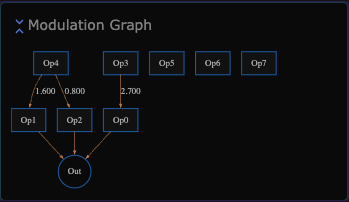
The Modulation Graph is an interactive visualization of the
Modulation Matrix. It provides a graphical representation of the
connections between operators.
Clicking on an operator toggles the visibility of its parameter group.
Lines (edges) between Ops represent non-zero modulation weights.
When the modulation weight is 1, the value is omitted from the
graph; otherwise, the weight is displayed adjacent to the edge.
Modulation Matrix
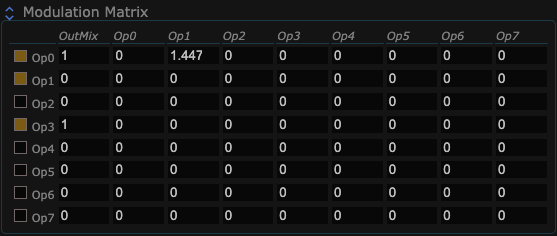
The Modulation Matrix is where you modify the modulation graph.
The leftmost column enables or disables an active modulator. This is useful when auditioning a sound and isolating the contribution of an individual operator.
Each row of the modulation matrix describes the connections
affecting that Op. The first column contains the mixing weight
from the Op to the audio output. When this value is non-zero,
the Op is a Carrier.
The remaining columns, labeled Op0 through Op7, specify the
modulation contribution from each operator to the Op represented
by that row. A non-zero value creates an edge from the source
operator to the row operator.
The matrix can also express modulation feedback. Feedback can be
difficult to constrain, particularly when weights are large or when
feedback cycles span multiple operators. For this reason, the
classic DX7 implementation limited its built-in algorithms to
topologies with self-feedback only.
Global Parameters
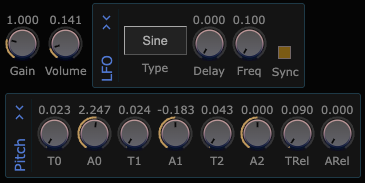
| Parameter | Range | Description |
|---|---|---|
| Gain | 0 - 8 | Final multiplier for amplititude gain. |
| Volume | 0 - 1 | Gain for all voices, default of .1 selected to handle 10 simultaneous load voices. |
| LFO Type | 0,1..5 | LFO Type: 0:Triangle, 1: SawDown, 2: SawUp, 2: Square, 3: Sine, 4: SampleHold |
| LFO Freq | .1 - 64 | LFO Frequency (usually between .1 and 5). Per-op depth modulates this value. |
| LFO Sync | 0,1 | LFOSync:1 causes LFO phase to be synchronized to the start of note. |
| LFO Delay | 0,1 | LFOSync:1 causes LFO phase to be synchronized to the start of note. |
| PitchEnv T0-T2, TRel | 0 - 8 | Controls the envelope timing, in seconds, of the Pitch-modulation envelope. |
| PitchEnv A0-A2, ARel | -48 - 48 | Controls the the Pitch-modulation envelope offset in semitones. When all amplitudes are 0, no pitch modulation is applied. |
Per Operator Parameters
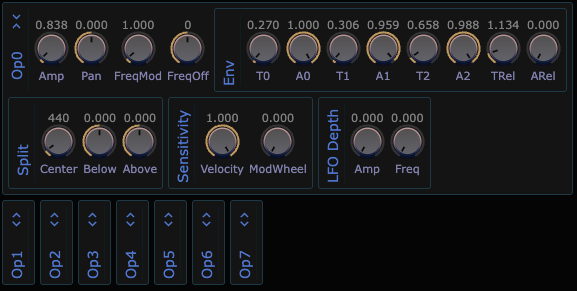
Each Op has the same set of parameters. Use the Expand/Collapse icon to show or hide an operator's parameters. The same operation can be performed by clicking the operator in the Modulation Graph.
The parameters are described below. You can also hover over a parameter name to display its tooltip.
| Parameter | Range | Description |
|---|---|---|
| Amp | [0, 16] | Linear amplitude of the operator. |
| Pan | [-1, 1] | Panning of the operator when used as a Carrier. |
| FreqMod | [0, 16] | Frequency multiplier for the operator. The base frequency is the note frequency multiplied by FreqMod. For example, A4 with FreqMod = 2.0 produces a base frequency of 880 Hz. |
| FreqOff | [-128, 128] | Constant frequency offset applied to the oscillator. Unlike FreqMod, this offset is constant across the keyboard. It can be use to create a fixed-frequency detuning. |
| Env A0, A1, A2 | [0, 1] | Linear amplitude reached by the envelope at T0, T0+T1, and T0+T1+T2 seconds, respectively. |
| Env T0, T1, T2 | [0, 8] | Time in seconds for the envelope to reach its associated amplitude. T1 is relative to T0, and T2 is relative to T1. |
| Env ARel | [0, 8] | After a key is released, the linear amplitude to target. Should be 0 for carriers. |
| Env TRel | [0, 8] | After a key is released, the time required for the operator to reach it release target amplitude. |
| Center | [50, 5000] | Frequency that divides the keyboard into low and high sections. This frequency depends only on the note itself, not on the operator's modulation settings. It is used by Below and Above to scale the operator's amplitude. |
| Below | [-2, 2] | Amplitude scaling exponent applied when the note frequency is below Center. Negative values boost lower-frequency notes and attenuate higher-frequency notes. For example, -1.0 produces 6 dB of attenuation per octave as frequency increases. The scaling factor is pow(note_frequency / Center, Below). |
| Above | [-2, 2] | Amplitude scaling exponent applied when the note frequency is above Center. Negative values boost lower-frequency notes and attenuate higher-frequency notes. For example, -1.0 produces 6 dB of attenuation per octave as frequency increases. The scaling factor is pow(note_frequency / Center, Above). |
| Vel Sens | [0, 1] | Controls velocity sensitivity. At 0, operator amplitude is independent of key velocity; at 1.0, it is fully dependent on key velocity. The scaling factor is 1.0 - VelSens + VelSens * velocity. |
| Mod Sens | [0, 1] | Controls modulation-wheel sensitivity. At 0, operator amplitude is independent of the mod-wheel value; at 1, it is fully dependent on it. The scaling factor is 1.0 - ModSens + ModSens * mod_wheel. |
| LFOAmp Depth | [0, 1] | Amount by which the LFO modulates amplitude. The modulation factor is 1.0 + lfo_value * LFOAmp, where lfo_value ranges from -1 to 1. |
| LFOFreq Depth | [0, 0.025] | Amount by which the LFO modulates frequency. The modulation factor is 1.0 + lfo_value * LFOFreq, where lfo_value ranges from -1 to 1. |
NoteExpression and MIDI controls
You can add runtime expression to your live performances as shown below.
Runtime expressions are produced live by MidiIn
as well as expressed programatically via MusicAPI.
The expression may target individual notes/voices via the API's NoteID
feature. A particular expression affects either global or
per-operator behavior. Per-op expressions interact with operator
parameters like Vel Sens and Mod Sens.
| Expression | Control | Target |
|---|---|---|
Volume |
2: "volume"|"expression" , 3:CC7|CC11 |
global |
Velocity |
1, 3 |
per-op |
Tuning |
2:"tuning", 3:Pitchbend |
global |
ModWheel |
3:CC1 |
per-op |
Sustain |
3:CC64 |
global |
ReleaseAll |
3:CC120 |
global |
| MusicAPI | Link | Per-Note |
|---|---|---|
1 |
Anode.NoteOn | yes |
2 |
Anode.NoteExpression | yes |
3 |
MIDI.Perform | API-only |
Credits
FM8 is a rewrite of libfmsynth, MIT licensed: Copyright (c) 2014
Hans-Kristian Arntzen (maister@archlinux.us).
FM8 includes these extensions:
- LFO Type, Delay, Sync
- Pitch Envelope
- Per-Op Envelope release level
- Shuffler to produce random+reasonable presets.