
/ Reference / Songs.hz
Hz.Plugins . 3rd Party Plugins
General MIDI . MIDI CC . MIDI notes
Configure
home . Topics . Interface . Reference . Examples
songs.hz(.hz) is an experiment in music-design ergonomics.
.hzis an ascii-text music notation that is easy on the eyes and makes simple the task of describing a multipart song to a digital audio environment with arbitrary plugins and plugin connections.
.hzoffers special notation to sequence, repeat and randomize musical ideas. It is designed to express multitrack compositions and allows tracks to share common properties like tempo and volume or to operate autonomously from other tracks.Files authored in
.hzformat can be edited, visualized and performed by Hz directly. They can also be converted to MIDI, abc or other representations. You can email-them to friends, store them in your git repository and even generate .hz files with AI.
The purpose of this page is to provide reference information for
.hz authors. But, as with many things, .hz is
best learned by example. If you haven't already explored
the examples, we recommend you do so prior to digging
further into this reference material. You can
find .hz examples here.
right-click to navigate to page sections
The Structure of .hz Files
.hz file
 └── Songs
      ├── Voices (instrument definitions)
      ├── Tracks (event timelines)
      └── Handlers (live input)
A .hz file holds one or more Songs. A song contains statements
and Voice, Track, and Handler blocks.
Song(Id:"songskel")
{
  Pan = .5 // a song statement (in the song block)

  Voice(Id:"v1")  // a voice block
  {
    // voice statements
  }
  Voice(Id:"v2") {} // more voice blocks

  Track(Id:"melody") // a track block
  {
    // track statements
    <a3 b3 c3 d3> // a measure of tonal note-events
  }
  Track(Id:"perc")
  {
    <bd sd z sd> // a measure of percussion note-events
  }
  more track blocks
}
To perform a song, all Tracks are evaluated "in parallel" from top to bottom, left to right. In other words all tracks play together.
Within a block, events are triggered in order and with
the timing defined by current block Tempo as well as
by the event position in a measure plus optional event-timing
controls. Usually, Tempo is shared across all tracks but
you can choose a Tempo for each track to obtain interesting
phasing effects. You can also change the Tempo between
measures or affect Tempo gradually with Accel.
Developing .hz Songs
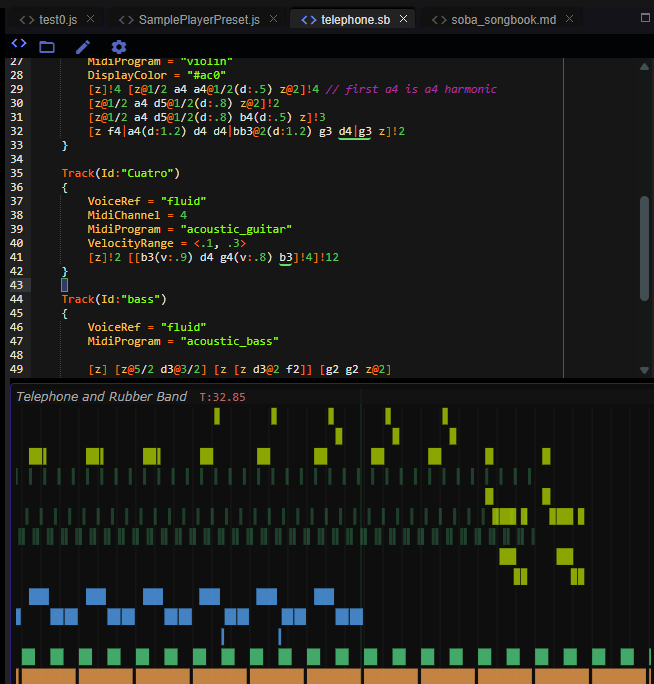
To develop .hz songs you simply need to open your favorite text editor
and start typing. Many folks appreciate color hints in a text editing
experience and .hz highlighters are available for ace editor and
highlight.js. Additional feedback can be provided in the form of
note visualization and even interactive playback. Hz offers both
of these capabilities as shown here and described
elsewhere.
Performing .hz files
To perform .hz songs, a runtime sound engine like Hz or HzWeb
initializes its audio engine with requisite audio nodes (anodes) then
interprets a selected song's Sequence, Voices and Tracks to schedule its
events. In the context of Hz, many .hz files (including most
examples) can be performed with
the single menu item Simple Hz Runner. More detailed soundscapes
can be configured with its Music API which offers
Songbook and Song
classes to support this process.
The Elements of a Song
Terminology
| Term | Notation | Description |
|---|---|---|
block |
{...} |
a group of statements bounded within braces. Statements and measures within a block only affect their block's state. Blocks represent scopes. |
variable |
Pan = a |
a name (here, Pan and a) that "holds" a potentially changing value. A variable day could hold "Monday". |
statement |
Pan = .5 |
modifies the state of a scoped variable or defines a measure |
scope |
{...} |
Constrains the region of affect for variable values. Scopes are nested to allow the same name to have different values in different scopes. |
measure |
<a3 b3 42 z> |
a group of musical events/notes bounded by angle brackets. Measures can include sub-measures and thereby apportion units of time for musical event sequences. |
submeasure |
<<a3 b3> c3 z> |
a measure located within another. A submeasure represents one unit in the enclosing measure, no matter how many events it contains. |
event |
a3, 42 |
when found within a measure < ... > identifiers and numbers are understood to be timed musical event that triggers a note, chord or parameter change. Events are performed relative to the timing defined by measures in which they reside. |
articulation |
&(v:.5) |
modifies the default performance of the associated musical event. Here v is the note velocity. |
anode |
"Hz.Samplo" |
A plugin audio node, referred to by its name. Anodes are used to synthesize or filter a sound based on a musical event and its articulations. |
Basic Types
| Type | Notation | Description |
|---|---|---|
number |
3 or 3.5 |
|
fraction |
3/4 |
useful describing event durations |
string |
"mystring" |
|
identifier |
myvariable (no quotes) |
|
list |
[1,2,3] |
a comma-separated list of values bounded by square brackets. Lists are used to represent choices, ranges, and sampled functions as described below. |
parameter list (plist) |
(3,5,6) or (Id:"foo", Scope:"Global") |
a comma-separated list of values or name:values bounded by parentheses. Used for function parameters, musical articulations or to describe instrument presets. |
function |
Arp(0,1,1) |
a builtin function is expressed as an identifier followed by a plist. |
Block, Section, Statement
A Song is made up of Voice, Track and Handler blocks.
Statement
Within a block, statements allow you to assign values to variables.
Statements can also define measures and invoke built-in functions.
Musical events are nested within measures.
Variables (aka identifiers) are divided into two categories, system
and custom. As a rule, system variables are capitalized and custom
variables should not be. Assignments affect only variable values in their
block or sub-blocks. This means you can assign different values
to the same variable in different blocks. These scoping rules are
typical of many programming languages.
Section
A Song block can be further divided into named sub-blocks using Section blocks.
A Section's name, Section(Id:"mySection"), is purely descriptive and optional
unless a Sequencer is active. When a song is performed
with active sequencing you must include an Id for each section and
design them knowing that they will be performed in a potentially
arbitrary order. This amounts to ensuring that variables are
initialized in sections that refer to them.
Section blocks are not independent subscopes of their track
and cannot be further nested. When developing a song, Sections
can be used to audition individual sections or experiment with
the movement from one section to another. This is done by
modifying the Sequencer statement as we explore below.
Block Structure
Now, let's delve more deeply into the structure and syntax available
in Song blocks.
Blocks are comprised of comments, assignment expressions and events.
Events are grouped into measure-groups, measures and submeasures
and bounded by <>.
{
  // Here is a block comment
  a = 3 // here is an assignment statement for a local variable.
  MidiProgram += 1 // here is an assignment expression for a system variable.
  <a b <c d> <e f>>  // here is a measure with submeasures
  // the outer measure has 4 events of equal duration.
  // The "c" event has a duration therefore of 1/2 of 1/4.
}
Assignment Expressions
lightbulb Note Assignment expressions assign values to variables that usually affect the performance of events that follow the assignment.
Some variables are system variables and, by convention, these all begin with an uppercase letter.
Assignments can modify existing values using
=,+=,*=. The latter two are only defined when the value-type is numeric.
Meter = [4, 4]
Tempo = 120
Scale = "C4 major"
<0 1 2 3>
<0 1 2 3>
Scale = "C4 minor"
<0 1 2 3>
<0 1 2 3>
All blocks except Sections represent a scope for assignment.
This means separate tracks can manage their own performance. without affecting other tracks. The Song block represents the outer (global) scope for variables and can be used to express shared behavior.
In contrast, Section blocks share the scope of their Track, Voice or Handler and therefore assignments within Sections can affect other Sections performed subsequently.
Measure
A block measure-group is divided into Measures. In common music notation,
measures ensure that musicians are synchronized. In .hz
we can synchronize track events and for example, scrub to a particular
time in the song, only if the tempo is shared across tracks.
We can also employ Section to achieve this at
a more granular level.
A measure's temporal duration is defined by the current (scoped)
value of Tempo reduced to seconds per measure (SPM).
To perform a block we simply iterate over its measures. Due to the fact that measures can be repeated or stretched, we can't assume that the i-th measure performed is the i-th measure in a section. That said, we can pre-flatten the repeats and now theoretically refer to measures with an index.
Events
Events within measures represent the flow of time from left-to-right,
top-to-bottom. Unless stretched, all outer-measures have a duration
defined by the current Tempo. Events are space-separated within a measure
and are described by a number, list, plist, or variable name. The
interpretation of event-values depends on the current voice and other
musical state. Musical voices are either tonal or percussive and it's
up to the instrument associated with the block's current voice to
interpret the event once converted to a numeric representation.
For example, numeric events represent notes relative to the current
Scale or as absolute MIDI note numbers. Variable (symbolic) events
represent sounds abstractly (eg beep, boop) and can be defined
to suit your own needs. When the songbook performer encounters
events with undefined values, it attempts to interpret them as
musical notes.
info Events like
a#3,b5,bb3are interpreted as you'd expect.
Similarly General MIDI provides standard
names and numbers for a range of percussive sounds and standard
instruments like sd and acoustic_grand_piano.
| Event Identifiers | Notes |
|---|---|
<ab4 bb4 c4 d#4> |
clear meaning for tonal instruments, due to SPN notation. |
<sd bd z hh> |
clear meaning, for percussion instruments, due to GeneralMIDI percussion conventions. |
<w x yd> |
no clear meaning, no predefined interpretation. |
lightbulb Note As we've already stated, you can assign your own meaning to any variable. Just make sure to assign it a value in the appropriate scope.
In addition to the selection of note is its timing. This is a fairly involved topic that we'll deal with in Ordering and Timing Events.
Notes
lightbulb Note By default, musical notes are expressed in a form like this:
c#7. A rest is expressed:z. Notice that the MIDI octave is included in this notation and follows Scientific Pitch Notation (SPN) where octaves range from -1 to 9, Middle-C is expressedc4anda4is 440 Hz. You can define your own tuning system by redefining the standard symbols as fractional numeric values in SPN though often alternate tunings can be specified to an anode/instrument directly.
Broadly speaking, events ultimately evaluate to absolute SPN note numbers.
Such numbers are interpreted by a synthesizer/instrument and can produce tonal
or percussive (ie not note-like) sounds. Thus, the following
measure makes perfect sense: <60 62 64 66>.
When notes are authored directly as numbers and not symbolically,
it is often convenient to think of the numbers in relative terms.
For example, it may be convenient to express an idea relative
to a musical scale. Now we can describe a run of notes in a
scale like so: <0 1 2 3>. If we change Scale, the same
measure will produce different tones. Note that between measures
you can change the value of Scale and Transpose allowing you
to change number interpretations through a song.
lightbulb Note We employ the current value of
Scaleas a guide on how to convert authored numbers into SPN numbers. If you author SPN notes directly you should setScaletoNil. This is the default value ofScale.
Musical Scales
A scale is requested by assigning a string value to the Scale identifier. There are many scales to choose from.
| Expression | Description |
|---|---|
Scale = "C3 minor" |
Sets key, origin and quality |
Scale = "C major" |
Sets key and quality, no origin |
Scale = "dorian" |
Sets quality, no origin, no key |
Scale = Nil |
Sets the null scale (numbers are unmapped) |
Note that there are 2 optional characteristics of a Scale, its origin and its key. The required characteristic of a scale, its quality, determines the subset of notes within an octave that are members of the scale.
Lets look at how numeric remapping applies in a range of circumstances.
| Scale | Input | Remapped | Discussion |
|---|---|---|---|
Nil |
<c4 d4 e4> |
<60 62 64> |
No remapping |
"D minor" |
<c4 d4 e4> |
<60 62 64> |
No remapping, expressed concretely |
Nil |
<0 1 2> |
<0 1 2> |
No remapping, no scale, very low-frequency notes. |
"minor" |
<0 1 2> |
<0 2 3> |
Chromatic values from minor scale, 0 origin |
"D minor" |
<0 1 2> |
<2 4 5> |
Chromatic values from D minor scale, 0 origin |
"D3 minor" |
<0 1 2> |
<52 54 55> |
Chromatic values from D minor scale, 52 (D3) origin |
It should be noted that without an origin, small numbers will remain
small numbers and these are likely to be in the subsonic range of
SPN notes. To bring such notes into the audible range you can offset
them by setting Transpose as seen here:
Track()
{
  Scale = "minor"
  Transpose = 30
  <0 2 4 6>*10
}
Sounds vs Notes
Events are often identified symbolically via an identifier (variable name). Variables are scoped to the track or voice and this allows each voice to define the meaning of eg "c3" or "sd". In the case of tonal voices, c3 will usually be converted to a SPN value, 48, though alternate tuning systems are possible. In the case of percussive voices, the variable name can be converted to some arbitrary combination of bank and program/note. General MIDI defines a mapping between sounds and note numbers and these names are provided as defaults.
// pre-defined symbols for percussive sounds include sd, bd, hh, etc.
<hh sd bd hh>*8
Note that some sounds may have multiple variants characterized by their index.
In order to support randomization, it may be advised that most variables evaluate to numbers. This allows each instrument to interpret a number or convert sd0 to a combination of MIDI channel, bank and note number. A generic GM percussion implementation would select channel number 10 and somehow map sd0-5 to an assortment of note numbers which in turn are internally mapped to a sample file and replay rate.
Chords
Chords consist of multiple simultaneous events and can be expressed in a few ways:
|-separated (no spaces):<c3|e3|g3>or<0|2|4>(the most concise form)- a list within a measure
<[c3,e3,g3]>or<[0, 2, 4]> - standard identifier
<Maj7> - custom identifier
<myFavoriteChord>, where you assign any of these forms tomyFavoriteChordlikemyFavoriteChord = [c3,e3,g3].
Chords can be expressed with pre-defined identifiers in the common form
Cmaj7_B" (with _ replacing the '/' of standard notation). While related
to Scale naming, standard chord names support chord augmentation and voicing.
As with Scales, keep in mind that chord names can be optionally keyed
and origined like so: Cmaj, C3maj, m9. Keyed chords must always
use upper case for the key. There are many chords
to choose from.
Chords can also be expressed in Roman-Numeral notation like <I z IV V>.
Note that this notation requires that a Scale be defined.
As with note events we must interpret chords authored with numeric values. As with Scales, builtin Chords have three components, quality, key and origin. This can be a bit confusing.
Consider:
| Scale | Chord | Remapped | In Scale | Discussion |
|---|---|---|---|---|
Nil |
[c4,d4,e4] |
[60,62,64] |
n/a | No remapping |
D3 minor |
[c4,d4,e4] |
[60,62,64] |
N | No remapping, resulting chord isn't in scale. |
D3 minor |
[60,61,62] |
[error] |
Y | Large numbers remapped beyond audible range. |
D3 minor |
[0,1,2] |
[50,52,53] |
Y | Numbers remapped via scale origin and indices. |
minor |
[0,1,2] |
[0,2,3] |
Y | Numbers remapped via scale indices, no origin. |
D3 minor |
C4maj |
[60,64,67] |
N | Scale fully qualified, scale irrelevant. |
D3 minor |
IVm7 |
[55,58,62,64] |
N | Scale provides root and origin, notes outside scale. |
D3 minor |
Cmaj |
[48,52,55] |
N | Scale no origin, use C3 same octave as D3 |
D3 minor |
maj |
[50,52,54] |
N | Scale, use same octave as D3, notes outside scale. |
Nil |
Cmaj |
[0,4,7] |
n/a | No scale, no origin |
Nil |
IVm7 |
[error] |
n/a | Roman numeral chords always require a keyed scale. |
It's important to recognize that named chords always produce values that are not interpreted as scale indices, but rather chromatic indices.
Event-Generating Functions
.hz includes a predefined, but growing, list of event-generating
functions that produce events procedurally.
Consider this measure:
<Arp(0,1,5)@2*2 Arp(5,-1,5)*2>
This is a shorthand representation for the following:
<<0 1 2 3 4>@2*2 <5 4 3 2 1>*2>
| Name | Description |
|---|---|
Arp(start, step, num, ?valuelist) |
Produces num events, starting at start, stepping by step. When valuelist is provided, the generated indices are used to select the associated value from valuelist. |
Euclid(hits, slots, offset, ?valuelist) |
Produces hits events, distributed across slots with an offset. When valuelist is provided, the hits will select a value from valuelist. |
Block Types
A song has 3 distinct block types to organize different aspects of your composition and sound design.
Track
A Track is where song events (notes, chords and sounds) reside.
Events are represented by an arbitrary name (identifier) and
so can have variable values. For convenience we pre-define standard
note-names like a#3 and sound names like sd (for snare drum).
The value of an event can be assigned within the track scope
or inherited from voice or global or built-in scopes.
Track blocks can be authored in chunks that can be combined when loaded.
This is done by defining a new track with a previously defined Id.
Contents of such tracks are appended to the first track with
that Id. This way you can interleave Tracks, for example,
on a section-by-section basis making it easier to keep different
tracks mutually consistent.
Voice
The Voice block allows you to specify parameters and context
for its instrument(s). Voices are referred to using their Id.
This is done by assigning each Track's VoiceRef as shown
in this snippet:
Voice(Id:"lead")
{
  AnodeInit = "Hz.Samplo" // define the lead voice's instrument.
  Pan = .25
}
Track(Id:"melody")
{
  VoiceRef = "lead"
  Scale = "C3 major"
  <0 1 2 3>

  VoiceRef = "anothervoice" // change our voice mid-track
  <0 1 2 3>
}
This design makes it possible for a track to switch voices as its performance proceeds.
Like all blocks, Voice is a scope for variables and is
responsible for converting names to concrete values. This symbol
lookup is performed relative to the referencing track so that
tracks can override the interpretation of a variable as its
events are performed. One use for this feature is to change the
key of an event sequence between measures or sections.
Voice blocks should request the performance environment to instantiate
one or more audio nodes (aka anodes) through a single AnodeInit request.
AnodeInit Examples |
Description |
|---|---|
AnodeInit = "GeneralMIDI" |
A single anode for this voice, default configuration. |
AnodeInit = ["GeneralMIDI", "vibraphone", (Gain:.5)] |
A single anode with an initial state. |
AnodeInit = ["Hz", "preset.js", (name:"v2")] |
The Hz runtime supports procedural (javascript) voice configuration allowing for arbitrary per-voice node graph construction. Here, Hz executes the function, InitVoice, defined in preset.js. |
AnodeInit = ["Hz", "_driverfunc_", (name:"v2", funcarg:3)] |
An alternate expression for procedural voice config where the driver script defines a config handler function. The optional plist is delivered to the driver function. |
Keep in mind: it's up to the performance environment to interpret
the AnodeInit requests and also to define voicing when it isn't
provided.
Voice blocks can modify voicing of track events by providing values
for voice parameters like VelocityRange or Pan. These values
can be modified between measures or sections and may be further modified by
evaluating each event's articulation.
Voice(Id:"piano")
{
  AnodeInit = ["GeneralMIDI", "piano"]
  VelocityRange = [.5, 1] // remap event velocities from [0,1] to [.5,1]
  Pan = .25
  <z>*10  // 10 measures of track events
  VelocityRange = [.25, .75] // quieter remapping
  Pan = 1
  <z>*10  // 10 measures of track events
}
When no voices are present in the song, the behavior depends upon
the performance environment. We recommend that you always include
Voice blocks and also include AnodeInits for your voices. If
you strive for portability we recommend that you use GeneralMIDI
for the instrument and provide a specific voice hint as above.
Handler
The Handler block allows you to integrate live performance into your songs. You can use it to practice jamming or enliven a performance of your songs.
A Handler listens to external live events within a SignalFamily
and triggers a response in the form of events, assignments or
function-calls in a song. Each time an event occurs, the entire
body of the handler is performed. When operating in the context
of a Sequencer you can use Sections
to modify the behavior of your handler. You can also have
multiple Handlers servicing the same signal family.
One use for Handlers is to request a new Sequencer
state. This allows you to select from different performances
of your song interactively. You may wish to set the initial Sequencer
to "Live" as described above. Here's an example that listens for
the keyboard keys "1", "2" or "3" and invokes SetSequencer
accordingly.
Handler(Id:"seqSelect", SignalFamily:"Hid")
{
  HidFilter("KeyDown", "1", "2", "3")
  mysequences = (1:<a b c>, 2:<b>*3, 3:Nil)
  SetSequencer(MidiKeyName, mysequences)
}
Handlers can invoke special functions to alter the performance state. These functions are divided into two categories: General and SignalFamily-specific. Here are the General functions:
| Functions for any handler | Description |
|---|---|
SetVar(var, block, key, plist) |
var is the name of a variable, block specifies a block name pattern, key selects a value from plist, value matching key is assigned to the named variable |
SetSequencer(key, plist) |
key selects a sequence from plist. Value must be a valid sequencer statement |
Here's an example to interactively mute or unmute tracks.
Handler(Id:"muter", SignalFamily:"Hid")
{
  HidFilter("KeyDown", "1", "2")
  options = (1:0, 2:1)
  SetVar("Mute", "Melody*", HidKey, options)
}
Currently Midi and Hid signal families are supported.
Future versions may support OSC (Open Sound Control) or
Ableton Link.
Ordering and Timing Events
Sequencer
Sequencer is a system variable and should usually be assigned
a value near the top of your Song block and then only once.
The default value for Sequencer is Nil and this means
that all tracks will be performed from top to bottom,
assigning no special significance to Sections defined
within the blocks.
When non-Nil, Sequencer describes the ordering and
repetition of Sections in performance.
The value assigned to Sequencer must describe an ordering of song
Sections in the form of a measure.
Due to the fact that the Sequencer describes only untimed, unarticulated,
non-chordal ordering of song sections, the sequencing notation
is a subset of that used to express note and measure events.
Specifically, measure nesting and repeat (*) operations are
supported, but time-stretch and articulations are not.
Here's a simple example:
Sequencer = <Intro <Verse*2 Chorus>*2 Ending>
This results in this Section ordering:
<Intro Verse Verse Chorus Verse Verse Chorus Ending>
The sole function of Sequencer is to describe section ordering.
Each section can have its own performance settings that can
differ between tracks. It's a common compositional requirement
to change values, like Tempo and Meterin a song-wide but
section-specific fashion.
One common solution is to define a special Track that contains measures and sections to house global controls. Such special Tracks must precede those that depend on its settings.
In the example below, we create a special track whose Scope is Global.
Keep in mind that tracks are evaluated in the order encountered in
the song so shared behavior should usually be expressed near the top of
its song.
Sequencer also supports a special value to notify the performance environment that real-time sequencing selection will be used.
Sequencer = "Live"
When operating in Live Sequencing mode, one or more Handler blocks
are required. Now, a performance system waits for SetSequencer events
and upon receipt, schedules a change to the currently active sequence
to complete. Only when the performance system receives the Nil will
a Live sequencing performance complete.
While sequencing, moving through sections referenced by Sequencer produces instantaneous jumps in the performance of each track. If a Section is not present within a given track, no jump will occur and the track will proceed in its usual linear ordering.
For example, it's common for Voice blocks to have no section-specific behavior. It may be useful to provide empty Section blocks in all Song blocks to advertise this fact that no special operations are required in that context.
// example skeleton: shared timing track with sequencing
Song(Id:"I have a sequencer!")
{
  Sequencer = <Intro <Verse*3 Chorus>*3 Ending>

  Track(Id:"sharedTiming", Scope:"Global")
  {
    // This track has no events, makes no sounds.
    // Its purpose is to establish tempo changes across the song.
    // We request "Global" scoping so all other tracks inherit
    // (but can override) these value.
    Section(Id:"Intro") { Tempo = 120 }
    Section(Id:"Verse") { Tempo = 150 }
    Section(Id:"Chorus") { Tempo = 120 }
    Section(Id: "Ending") { Accel = -.1 }
  }
  Track(Id:"melody")
  {
    Section(Id:"Intro") { ... measures here ...  }
    Section(Id:"Verse") { ... measures here ...  }
    Section(Id:"Chorus") { ... measures here ...  }
    Section(Id:"Ending") { ... measures here ...  }
  }
  Track(Id:"bass") {...}
  Track(Id:"perc") {...}
}
Meter, Tempo, Accel
lightbulb Note Typically, Tracks share the notion of Meter, Tempo and Accel to facilitate their synchronization. These values can change instantly across a measure or between sections. The Tempo can also be changed gradually through the specification of non-zero
Accel. Finally, to achieve phasing effects, each Track can override the global Tempo.
Meter, SPM, Tempo, and Accel are reserved identifier names that can
be overridden by a track or controlled by the Sequencer.
The Meter of a track characterizes how to count beats. Following
Modern Staff Notation
the meter is represented as list fraction, like [4,4], [3,8] or 3/4.
The second number defines the size of a beat and is typically
one of 1, 2, 3, 4, 8, 16. The first defines the number of beats
in a measure and can be used to guide note-emphasis by an instrument
or note-articulation.
The Tempo of a track characterizes the rate at which beats are played.
In Modern Staff Notation, Tempo is described by an Italian word like Adaggio
or by a count in beats/minute. Since there is no single uniform notation
for a beat in songbook notation, we interpret the combination of Meter
Tempo, and Accel to produce a value of SPM, or seconds per measure.
You can bypass this calculation by providing an explicit value for SPM.
The SPM time-interval is divided amongst events (and measures) according
to the event count and timing described below. In our physics jargon
below, SPM is the velocity at the start of a measure. When
Accel is non-zero, SPM is effectively changing through the performance
of each event within the measure. When Accel is greater than 0 the
performance speed increases and when it's less than 0 it decreases.
The units of Accel are discussed below but useful values tend to be
in the magnitude-range of 0.01 - 0.2.
Event Timing: Implicit, Explicit
As mentioned earlier, songbook events must reside within a measure.
Measures contain a space-separated list of events described as a number, an identifier, a list, a plist or an inner measure. Identifier values can be defined or overridden within any block outside the scope of an outer measure. Identifier values are obtained by inspecting the track, then its current voice, then the song.
Event timing is characterized by onset and duration. These are calculated
based on all events defined in its measure. The calculation also accounts
for the current values of Tempo and Accel.
flag Important In all cases, the duration of an event depends on the number and timing of all events in its measure. The addition of a single new event will reduce the duration of all occupants of the measure.
For example, here the first measure has quarter notes and the second has half notes.
<a3 a3 a3 a3> <a3 a3>
Submeasures, Stretch and Repeat
This approach generally works well. But when you need notes with different
durations in the same measure, .hz offers three options:
- define fractional time-intervals implicitly by nesting measures within measures.
- use the repeat operator,
*, to produce more events in a measure implicitly affecting their durations. - use the stretch operator,
@, to provide values explicitly.
| Explicit Timing Modifiers | Interpretation |
|---|---|
@_N_ |
stretch/squeeze event by N, N is number |
*_N_ |
repeat event N times, N is integer |
Here are three ways to say the same thing.
// two eighth notes, 3 quarter notes assuming 4/4 time
<<a3 a3> a3 a3 a3>   // submeasure
<<a3*2> a3*3>        // submeasure, repeat
<a3@1/2 a3@1/2 a3 a3 a3> // explicit timing, no submeasure
Any event can include both one stretch
and one repeat modifier enabling the following: <a3 b3 c3 d3>@3*4.
This is interpreted as the measure of 4 notes stretched to a length 3
times its implicit duration and then repeated 4 times.
warning WARNING Since we apply the optional stretch prior to the repeats it must also be expressed in this order. This is a syntax error:
<a3 b3 c3 d3>*4@3.
Time modifier numbers are represented as unsigned fractions: 4/3,
integers:2 or decimal numbers: 2.2. Fractions may be preferred over
decimal values since they can represent common durations like 1/3 exactly
and suffer no loss of precision when combined via multiplication and addition.
Note that generalized division is not implied by our use of fractions.
Also note note that * isn't a numeric multiplication operator.
When a function follows the * or @ operators, the function is evaluated
to both produce a duration or repeat-count. For example, <a3*RandRange(3,8) z>
replaces the first event of the measure with a randomly selected number of
its repetitions. Such functions are referred to as Repeat Functions.
info The careful reader will notice that here we conflate time-spacing with event-duration. However, to achieve effects like
staccatoorlegatowe actually need a more nuanced articulation of duration. This conflation will be resolved below.
Here are some event examples with explicit and implicit timing.
| Example | Interpretation |
|---|---|
<a b c d> |
4 equal-duration events. |
<0 1 2 3> |
4 equal-duration events. |
<a b@2 c d> |
5 time units. b held twice as long. |
<<a b> c d> |
3 time units, a and b each occupy 1/6 of total. |
<a*2 c d> |
4 time units, a is performed twice. |
<a3*4 d> |
5 time units, a is performed 4 times. |
<[c3,e3,g3]@3 d> |
4 time units, first three are a held C-major triad chord. |
<Euclid(3,8) d> |
2 time units, first is submeasure with 8 euclidian slots. |
<<a@3 b> c c> |
broken rhythm |
Time Warping
lightbulb Note Time warping modifies the temporal position of a measure's events. It can be used to produce swing rhythms, drum rolls and other special effects. You may wish to combine it with note duration for increased effect.
Time warping is expressed in hz as the measure articulation,
twarp. As such it is attached to a measure and is expressed with the plist
valueas shown here:
<a*8>&(twarp:(a:.5,k:4,p:1))
twarp accepts 3 parameters:
| Name | Description |
|---|---|
a |
the swing amount between [-1, 1]. 0 is no swing. |
k |
the cell-size for swing. For 8th note swings in 4/4 time, k should be 4. When a is 0, k has no effect. |
p |
the power exponent for exponential timing (0,2). When p is 1, no acceleration occurs. > 1 accelerates, < 1 decelerates. |
| Example | Interpretation |
|---|---|
<0*8>&(twarp:(k:4,a:.25)) |
swing timing via time-warp articulation (more below) |
Articulation
The term articulation is used to describe variations on the performance of an event. A note's loudness, its relative duration and other instrument-specific modifications like vibrato all fall under this umbrella.
Global Articulation
You control the default settings for some articulators simply by assigning to its System variable. As with all variables, these values are scoped to the block in which the asignment occurs. Thus, these settings can differ according to Track or Section. They can even be overridden on an event-by-event basis as described below.
| Name | Meaning | Value Range | Default |
|---|---|---|---|
Dur * |
Relative duration (for stacatto/legato) | (.01, 4+) | .95 |
Velocity * |
Controls volume and/or instrument effect | (0, 1) | .8 |
Velocity Range |
Maps velocity (0-1) to min-max | list | [.2, .8] |
Pan * |
Relative position in stereo field (depends on instrument) | (0 (left), 1(right)) | Nil |
Volume * |
Mix Level | (0, ?) | Nil |
*: accepts list for randomization
Event Articulation
Individual events can be articulated by optional comma-separated fields
enclosed by parentheses and preceded by & following optional event-timing.
<a3*4&(v:.5,d:1.2)>set note velocity and duration
When working with chords we can articulate individual notes using
the special + character. Note that we cannot stretch or
repeat individual notes within a chord> We can* modify duration
on a per-note basis.
<a3|c4+(v:.9,d:.5)|e4*4&(v:.5,d:1.2)>note-in-chord articulation
Multiple articulations can be provided and these may represent modification of
global articulations within the voice. Articulations are processed
left-to-right so the last-most requests may shadow prior ones. Each
articulation takes the form key:value where the value can either
be a value or an identifier (variable).
Functional Articulation
If the value of an articulator is a list it will be evaluated
over the course of the note or the measure. A special syntax is
supported to compactly support randomness as well as interpolation
style.
| List Syntax | Interpretation |
|---|---|
[0,-.4, .5] |
N sampled points along a function curve. |
^[0,5, -.4,5, .5,0] |
N/2 sampled points along an exponential function curve. Length must be a multple of 2 (val, power) but the last power value is ignored. |
??[0,5,10] |
A randomly chosen value from the list. |
?[0,5] |
A random value in the range 0-5. |
Some articulations, like tuning can be articulated over the course
of a single note. Others like velocity and duration are associated
with event's note-on and aren't interpolated over the note.
Depending on the articulation binding (note vs measure), values like
velocity can still be subject to measure-interpolation. And
this can produce different velocities for each note.
In Hz's preview window zooming in to
individual notes will reveal articulated values as tiny rectangles
atop rectangle for each note.
Universal Articulators
These articulators are well-defined and supported by all voices.
| Key | Meaning | Value Range |
|---|---|---|
v |
velocity | (0+, 1) |
d |
dur | (0+, ?), <1: staccato, >1: is legato |
Optional Articulators
These articulators are not universally supported. Their value is in the generic nature of the expression. Ie: they aren't tied to specific parameters of a particular voice/instrument. If you are willing to commit to a voice, ie your favorite synth, you might consider using custom voice articulators. To ensure that your songs can be performed in diverse voice configurations, these optional articulators are a good bet. They have support / meaning in both CLAP and pure-MIDI voice settings.
Some articulators can capture changing values over the lifetime of a single note. These articulators accept lists or numbers. For example, a numeric tuning value may be useful for custom tuning schemes while a varying list pitch bend would be required to gradually change the pitch over the note. Keep in mind that some of these articulators may have global, persistent effect, especially in MIDI instruments. These may need to be reset after use.
| key | meaning | range | default | notes |
|---|---|---|---|---|
vo * |
volume | 0 - 4 | 1 | scale depends on instrument / platform |
pa * |
pan | 0 - 1 | .5 | clap is 0-1 |
tu * |
tuning/bend | -N,N | 0 | clap: N semitones, midi: N is 1, range controlled by voice. |
vi * |
vibrato (depth) | 0 - 1 | 0 | combines with vr and vd |
vd |
vibrato delay | 0 - n | 0 | seconds |
vr |
vibrato rate | 0 - 1 | ||
ex * |
expression | 0 - 1 | ||
br * |
brightness | 0 - 1 | clap: float semitones, midi: 0-127 -> -2-2 | |
pr * |
pressure | 0 - 1 | clap: float semitones, midi: 0-127 -> -2-2 | |
cc{num} * |
MIDI cc | 0 - 1 | MIDI control message | |
mw * |
MIDI modwheel | 0 - 1 | MIDI modwheel | |
pw * |
MIDI pitchwheel | -1 - 1 | MIDI pitchwheel |
*: accepts list
| Examples | |
|---|---|
<a3*4(v:.5,d:1.2)> |
set note velocity and duration |
<a3*4(tu:[0,-1])> |
pitch bend each note one semitone down |
Articulating Time
In addition to tonal articulation, we support time articulation to achieve
swing beats and time warping. Time articulators are unique from other
articulators in that they apply to a measure rather than the events
within the measure.
| Examples | |
|---|---|
<a3*8>&twarp(k:4,a:.5) |
swing timing for the 8th notes. |
<a3*16>&twarp(p:2) |
exponential timing for 16 notes in the measure |
More details about timewarps can be found in the [above][def]. An example of time warp is found in the miscellaneous collection of the .hz example-set.
Voice-Specific Articulators
As described in the voices overview, arbitrary instrument parameters
can be defined and then "performed" as events. Any articulators that are
not predefined (above) are assumed to be custom articulators. Typically
you should define the mapping between a short articulator symbol, say vsmoosh,
then, in the Voice block define the mapping between vsmoosh and the
actual anode parameter name, say Spectral Smoosher.
The first example below assumes that both vsmoosh and vsmash
are mapped to parameter names in the current voice (defined by VoiceRef).
In this example you can provide values for these parameters on
any event. If you wish to perform voice parameters defined within
the voice directly, just treat them like any event as shown in the
second example.
| Examples | |
|---|---|
<(vsmoosh:3,vsmash:[1,2])> |
set voice parameter values |
<c3&(vsmoosh:[0,.2,-.2])> |
voice param automation |
Keywords, Functions, Types
System Variables
This table shows the built-in System Variables and their presumed value-types.
| System Variable | Type | Default | Description |
|---|---|---|---|
Meter |
2-list | [4, 4] | |
Tempo |
number | 120 | beats per minute (BPM) |
SPM |
number | none | seconds per measure |
Accel |
number | 0 | tempo acceleration |
Sequencer |
measure | "Live" | sets the song sequencer. |
SequenceIndex |
integer | 1 | current index of sequencer. |
VoiceRef |
string | Nil | name of current voice for the block |
AnodeInit |
list | Nil | defines Voice's Anode's and their initial states |
Anode |
integer | 0 | index into Voice's AnodeInit |
Scale |
string | Nil | name of tonal scale |
Transpose |
number | 0 | semitones to transpose notes. |
Velocity |
number,list | .8 | the default velocity value unless overriden by note-articulation. |
VelocityRange |
list | [.2, 1] | converts Velocity values between 0 and 1 into this range. |
Dur |
number | .95 | current duration articulation, multiplier for implied dur. |
Pan |
number | Nil | current pan articulation betwee 0 and 1 (.5 is center) |
Volume |
number | Nil | current volume articulation between 0 and inf (linear scale) |
MidiBank |
number | 1 | for MIDI instruments |
MidiProgram |
number | 1 | for MIDI instruments |
MidiChannel |
number | 1 | for MIDI instruments |
MidiKey |
number | Nil | available to Midi Handlers |
MidiVelocity |
number | Nil | available to Midi Handlers |
MidiCmd |
string | Nil | available to Midi Handlers (KeyDown, KeyUp, CC, …) |
MidiData1,2 |
number | Nil | available to Midi Handlers (associated with MidiCmd) |
HidEvent |
string | Nil | available to Hid Handlers (KeyDown, KeyUp, MouseDown, MouseUp, MouseMove) |
HidKey |
string | Nil | available to Hid Handlers ("a", "A", …) |
HidMouseX |
number | Nil | available to Hid Handlers (for Mouse events) |
HidMouseY |
number | Nil | available to Hid Handlers (for Mouse events) |
HidMouseB1 |
number | Nil | available to Hid Handlers (for Mouse events) |
DisplayColor |
string | Nil | display color control. |
DisplayOffset |
int | 0 | display row offset (for entire track) |
Functions
System Functions
lightbulb Note System Functions are valid in any block.
| System Function | Description |
|---|---|
Log(value, ...) |
logs a diagnostic message to the log panel |
Repeat Functions
lightbulb Note Repeat Functions are only valid after the repeat operator (
*)
| Repeat Function | Description |
|---|---|
RandChoice(a, b, c, ..) |
returns one of the parameters at random. |
RandRange(a, b) |
returns a random integer between a and b (inclusive). |
Example: <a3*RandRange(3,5)>.
Notegen Functions
lightbulb Note Notegen Fuctions are valid wherever note-events are, ie: within a measure.
Arp
Arp(start, step, num, ?vallist)
Arp can be used to produce arpeggios and scales. It produces num
notes starting at start, each offset by step. If vallist is
provided, the number selects from that list, otherwise the result
are the numbers. In this example, we selection contiguous notes
from the Persian scale rooted at C3.
Section(Id:"arps")
{
  Scale = "C3 persian"
  < Arp(0,1,5) >*2 // up
  < Arp(4,-1,5) >*2 // down
  < Arp(0,1,5) Arp(4,-1,5) >@2*2 // updown
}
Beatbox
Beatbox converts a compact beat-notation into .hz notes and
is best described by example.
// Beatbox example
Section(Id:"levee")
{
  beats = (
    hh: "x.x.|x.x.|x.x.|x.x.|",
    sd: "....|x...|....|x...|",
    bd: "xa..|...a|..ab|....|"
  )
  artic = (a:"v:.5", b:"v:.9")
  <Beatbox(beats, artic)>@2*4 // stretch: a row has two measures
}
Beatbox(beats, ?artics, ?rot)
Beatbox converts a compact beat-notation into .hz notes. Each entry of
beats is analogous to a track: one sound per entry. The value of
for each entry is a string where column represents a moment in time,
so all non-space, non-bar (|), non-dot (.) character in the a given
column play simultaneously. As you can see in the example,
beat-notation is quite natural and efficiently describes rhythmic patterns,
typically repeated during a song.
| Parameter | Type | Description |
|---|---|---|
| beats | plist whose keys are note-symbols and values are strings of beats. |
. <space> are rests and, by default, x means hit. | is a visual aid available to break a row into chunks. |
| artics | optional plist mapping a character in beats to its articulation. |
articulations can add dynamics to your beats. Typical articulations are velocity, and duration. (a:"v:.6,d:.5") adds a to the Beatbox vocabulary. |
| rot | optional int or int-variable that expresses a column offset into the beats matrix. |
by incrementing rot through the performance you can produce interesting phasing rhythms. |
Euclid
Euclid(hits, slots, offset, ?vallist)
Euclid is used to produce rhythmic event arrangements. It produces hits
events in slots potential sub-locations. If vallist is provided,
the hit number selects from the vallist (modulo its length), otherwise
the hit slot is filled with the hit number.
Section(Id:"Euclid")
{
  VoiceRef = "piano"
  < Euclid(2,8,0,[e3]) Euclid(3,8,0,[b2])
    Euclid(2,8,0,[d3]) Euclid(3,8,0,[c3]) >@2

  VoiceRef = "percussion"
  `<Euclid(3,8,0, [sd,lt1,hh])>`
}
Handler Functions
lightbulb Note Handler Fuctions are only valid in Handler blocks.
| Handler Function | Description |
|---|---|
MidiPerform() |
directs live midi traffic to the Anode associated with VoiceRef |
MidiFilter("MidiCmd", ...) |
filters live midi traffic, an unfiltered event causes handler skip it. |
HidFilter("HidEvent", ...) |
filters live HID traffic, an unfiltered event causes handler skip it. |
SetSequencer(key, plist) |
searches plist for a sequence value associated with key |
SetVar(var, block, key, plist) |
sets the value of a variable in track specifies a track name pattern, var is the name of the variable to set, key selects a value from plist, value matching key is assigned to the named variable |
Reserved Tokens
Tokens are the keys in a parameter list. Here's a table of Reserved tokens.
| System Tokens | Type | Default | Description |
|---|---|---|---|
Id |
string or integer | "0" | Id field for blocks |
Mute |
number | 0 | Track mute |
Verbose |
number | 0 | Block verbosity |
Scope |
string | "Private" | Block scope (Global, Private) |
SignalFamily |
string | Nil | (eg "Midi") Handler constructor parameter |
Value Types
Here's a table showing examples of values. Typically these are placed on the right-hand side of assignment statements.
| Value | Description | Notes |
|---|---|---|
c4 |
identifier | |
3 |
integer number | |
3.5 |
decimal number | |
4/3 |
fractional number | |
"c major" |
string value | |
[1,2,3,4,5] |
list | Unqualified, list of Values |
??[1,5] |
choice list | Random number between 1 and 5 |
_[1,5,1] |
range list | 3rd value optional |
<a b c> |
measure event | Values within are events. |
Nil |
the empty value | |
(key:value, key:value, ...) |
parameter list | key:value |
(val1, val2, ...) |
parameter list | value list |
Handler Signal Families
Midi Handler
These special functions are available within MIDI handlers as governed by
the Handler's SignalFamily:Midi configuration.
| Functions for Midi handlers | Description |
|---|---|
MidiPerform() |
Delivers all MIDI events to associated voice |
MidiFilter(midiCmd, ...) |
Events that don't match filter return from handler. |
These special variables are available within MIDI handlers.
MidiKey |
number (0-127) that represents the most-recent key. |
MidiKeyName |
name for MidiKey |
MidiChannel |
number (0-15) channel for last event |
MidiCmd |
name of last midi cmd |
MidiData1 |
number (0-127) MIDI data pkt 1 |
MidiData2 |
number (0-127) MIDI data pkt 2 |
The are the potential values for MidiCmd and MidiFilter():
| Value | Midi Pkt 0 |
|---|---|
KeyUp |
0x80 |
KeyDown |
0x90 |
KeyPressure |
0xa0 |
CC |
0xb0 |
ProgramChange |
0xc0 |
ChanPressure |
0xd0 |
PitchWheel |
0xe0 |
SysEx |
0xf0 |
Here's an example with two Midi event handlers.
Handler(Id:"midiEx", SignalFamily:"Midi", MidiDevice:"default")
{
  VoiceRef = "MyMidiVoice"
  // multisection
  Section(Id:"a")
  {
    Transpose = 3
    // MidiPerform function interprets Midi stream and delivers
    // events via VoiceRef and its current Anode
    MidiPerform()
  }
  Section(Id:"b")
  {
    // We can trigger events on each midi event.
    // In this mode, we typically wish to filter out some
    // of the MIDI traffic.
    MidiFilter("KeyDown")

    // if we make it here, a NoteOn occurred and MidiKey and MidiVelocity
    // are valid.  Each note triggered produces an arpeggio.
    Transpose = MidiKey
    a = <0 2 4 6>*4
  }
}
Hid Handler
Hid stands for "Human Interface Device" and most computers have a least
two of these - a keyboard and a mouse. A performance environment may
support general Hid devices (like arduinos, joysticks, etc) or
support no Hid devices at all. Hz version 1 supports keyboard
and mouse events and generates these events only when the mouse/keyboard
focus targets its Sandbox window.
These special functions are available within MIDI handlers as governed by
the Handler's SignalFamily:Hid configuration.
HidFilter(hidEvent, ...) |
events that don't match hidEvent return from handler. |
When HidFilter encounters list in the filter parameters it is interpreted
as a range for mouse coordinate normalization.
These special variables are available within Hid handlers.
HidEvent |
one of KeyDown, KeyUp, MouseDown, MouseUp, MouseMove |
HidKey |
when HidEvent indicates Key, holds the key name. |
HidMouseX |
when HidEvent indicates Mouse, holds normalized x coordinate. |
HidMouseY |
when HidEvent indicates Mouse, holds normalized y coordinate. |
HidMouseB1 |
when HidEvent indicates Mouse, holds button1 state. |
Here's a snippet that changes a custom parameter, Qmix, of myvoice.
Handler(SignalFamily:"Hid")
{
    VoiceRef = "myvoice"
    HidFilter("MouseMove")
    vparam = (q:HidMouseX)
    <vparam> // Change a custom voice parameter for every mouse position
}
Appendices
Note Expressions on Two Planets
key |
CLAP expressions | |
|---|---|---|
vo |
VOLUME | 0 < x <= 4, linear scale |
pa |
PAN | 0 left, 0.5 center, 1 right |
tu |
TUNING | semitones: from -120 to +120. |
vi |
VIBRATO | 0-1 |
ex |
EXPRESSION | 0-1 |
br |
BRIGHTNESS | 0-1 |
pr |
PRESSURE | 0-1 |
key |
MIDI expressions | |
|---|---|---|
cc7 |
Volume | mix-level |
cc11 |
Volume | expression |
cc10 |
Pan | 0,64,127 is left,center,right |
0xE0 |
Bend/Tuning | pitch-wheel 14 bits (channel effect) |
cc1 |
Bend | mod-wheel 7 bits |
cc76-78 |
Vibrato | Rate, Depth, Delay |
cc11 |
Expression | performance controller |
cc74 |
Brightness | |
0xA0 |
Pressure | polyphonic aftertouch |
0xD0 |
Pressure | channel aftertouch |
Timewarp Implementation
Time warping is presented above.
Here's an implementation of time-warping that distorts time within
a measure defined over t:[0,1]. Here, p is a the exponent such
that value of 1 is linear, values > 1 produce acceleration and < 1,
deceleration. The values k and a are used to produce swing rhythm
where k defines the beat-unit (typically 4 to cause 8th notes to swing).
a is the amount of swing with positive values (like .5) producing a
typical swing feel. Negative values produce the inverse effect.
One nice thing about this representation is that we can combine the acceleration with the swing in this single function.
function swing(u, a)
{
  const mid = 0.5 + 0.5 * a;
  if (u < 0.5)
    return (u / 0.5) * mid;
  return mid + ((u - 0.5) / 0.5) * (1 - mid);
}
function twarp(t, p=1, k=4, a:0)
{
  // A. global warp
  const g = Math.pow(t, p);

  // B. cell decomposition
  const kg = k * g;
  const cell = Math.floor(kg);
  const u = kg - cell;

  // C. local swing
  const u2 = swing(u, a);

  // D. reassemble
  let result = (cell + u2) / k;
  return result;
}
The Physics of Musical Motion
In the case where tempo is constant we can pre-compute all measure
locations (in time), where MPS is measures per second && SPM
is its inverse.
measureStart = measureNum * SPM
Slightly more complex is the case where tempo is constant per measure.
measureStart = lastMeasureEnd + SPM
Note that this requires "integration" since the effects of tempo changes
depend upon prior tempo changes. In other words the value of lastMeasureEnd
isn't the result of a simple (non-iterative) formula.
The general case where tempo changes gradually (but with constant acceleration) follows the physics formula
t0 + v0 * dt + .5 * a * dt * dt
where a is the change of tempo and v0 is the original tempo. If we know the tempo at two points (measureStart and measureEnd), this becomes:
measureStart = measureStart + avg(SPM)*dmeasure
which applies the average tempo over a time interval. Again, this assumes constant acceleration.
Finally we consider the case where a time-stretch is in place via <a3> <a3>@3.
The <..>@3 indicates that the measure comprising a3 plays 3 times
longer/slower than it normally would. The question at hand is how to
interpret acceleration in this context. We can interpret time stretching
as an instantaneous change of SPM via SPM = SPM*3. Under 0 acceleration
and assuming SPM of 1, the first measure completes at t==1 and the second
measure complets at t==4. As it turns out (hands waving), under acceleration
we must not scale acceleration by the time stretch in order for measures
across time stretch changes to ensure continuity across such changes.
Music Dictionaries
Tonal.js has a variety of built-ins found here:
.hz files can use any of the named Scales or Chords. Other tonal.js
capabilities are available via Hz Sandbox scripts (.js).
Anatomy of a DisplayColor
The DisplayColor builtin parameter can take a string color in a
variety of formats, following the WWW standard.
| Example | Description |
|---|---|
| "#333" | darkish gray in shortened form, each 3 can be <0-f> |
| "#303030" | darkish gray in standard form, each 30 can be <0-f> |
| "rgb(r,g,b)" | rgb values between 0 and 255 |
| "rgba(r,g,b,a)" | rgb as above, a is 0.0-1.0 |
| "hsl(h,s,l)" | hsl: h between 0-360, s and v like: 50%. |
| "darkorange" | www keywords: "lime", "teal", "gold", "olive", "pink", "plum", "steelblue", "tomato", "wheat" … |
See also
Wikipedia Musical Notation | tonal
abc | abcmidi | impro-visor | strudel | music xml