/ Ex / Songs.hz / Reich
Hz.Plugins . 3rd Party Plugins
MIDI . MusicAPI
home . Topics . Interface . Reference . Examples
info This song mimics Steve Reich's Violin Phase.
Open
reich.hzin the code editor by clicking on the file in your workspace. Now right-click and selectSimple Hz Runner.
This song comprises three Voices and two Tracks. Each track repeats phrase
twice and the phrase is just a 25 repetitions of 12 notes. The second track
performs phrase at 99% of the speed of phase1 and this produces a hypnotic
phasing effect. Note also, that phase2 changes Transpose and voice between
phrase invocations. Both voices use the GeneralMIDI instrument that
follows the General MIDI standard for instrument
naming selection.
Selecting reich.hz reveals it in the code editor.
Then if you right-click you'll see two options:
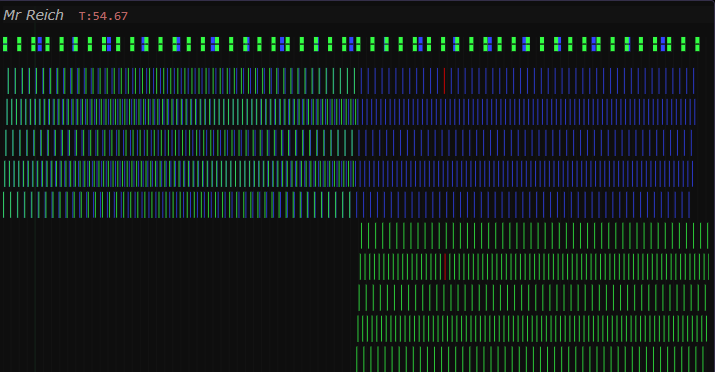
Simple Hz Runner- performs the songToggle Preview- shows a piano-roll representation of the song. Clicking here updates the text-editor cursor and vice-versa. During performance the panel auto-scrolls and highlight the current notes.
Song(Id:"Mr Reich")
{
  Tempo = 140 // BPM

  // Here's a musical phrase that will be performed by tracks.
  // The sequence of notes is repeated 25 times.
  phrase = <e4 f#4 b4 c#5 d5 f#4 e4 c#5 b4 f#4 d5 c#5>*25

  Voice(Id:"v1")
  {
    // Select a piano for this voice, to keep things crisp
    // we also set the instrument's envelope release time (R) to a
    // small value.
    AnodeInit = ["GeneralMIDI", "piano", (R:.1)]
    DisplayColor = "#34F" // blue display color in preview panel (right-click)

    // Over a duration of 50 measures, sample volume and pan 20
    // times.
    pa = (pa:[0.5,.0])
    vo = (vo:[1,.76,.85,1])
    <pa|vo!20>@50
  }

  Voice(Id:"v2")
  {
    AnodeInit = ["GeneralMIDI", "piano", (R:.1)]
    DisplayColor = "#3F4" // green in the preview panel
    artic = (pa:[.5,1,.5,1,.5,1,.5,1],vo:[1,.7,1])
    <artic*25>@25
  }

  Voice(Id:"v3")
  {
    AnodeInit = ["GeneralMIDI", "violin", (R:.1)]
    DisplayColor = "#734"
    Transpose = -12 // violin notes are transposed relative to piano.
    <z>*25 // ignore the first 25 measures
    artic = (pa:[.5,1,.5,1,.5,1,.5,1],vo:[1,.7,1])
    <artic*25>@25
  }

  // Tracks to perform the phrase -----------------------------
  Track(Id:"phase1", Mute:0)
  {
    // perform our phrase twice with v1
    VoiceRef = "v1"
    $<phrase>
    $<phrase>
  }

  Track(Id:"phase2", Mute:0)
  {
    // modify tempo to achieve our phase effect.
    Tempo *= .99
    VoiceRef = "v2" // perform 1st phrase with v2
    $<phrase>
    VoiceRef = "v3" // perform 2nd with v3 (violin)
    $<phrase>
  }
}
Here's what you see if you Toggle Previewer in the CodeEditor.
Notice the effect of Transpose on the second phrase of track phase2.
This also coincides which the MidiProgram change and the introduction of
the violin voice.